Calibre
Calibre is a cross-platform free and open-source suite of e-book software. Calibre supports organizing existing e-books into virtual libraries, displaying, editing, creating and converting e-books, as well as syncing e-books with a variety of e-readers.
- For more information about this app, follow this link.
Initial Setup
Configuration
- Once you have installed Calibre, paste the copied URL into your web browser to access the web UI, you will be greeted by a login form. Log in with your username and the password you set during the installation.
- Our Calibre installation comes with a pre-configured library:
- You could choose a different path within your home directory, though the directory needs to be created and be empty OR include a Calibre database library from a previous installation.

- In this guide, we will be using the default path
~/media/Calibre Library.
- Click the Next button.
- Choose the generic device you will be using to read your ebooks.

- Click the Next button.
- Click the Finish button to complete the setup of Calibre.

Add Books
- Books can be added to the database library by manually adding them into default library path, in this guide that would be
~/media/Calibre Library.
- Books can also be manually added by clicking the Add Books button within the Calibre UI.
- Next, choose how you want to add books, in this guide we will choose Add books from a single folder.

- Note that the file dialog defaults to the
/config directory of the docker. Navigate to /home/username to enter your home directory. The next time you use the file dialog, click the file path and you will have the option to select previously selected paths (e.g. your home directory).
- Navigate to the location where your book is located, mark it and click Open.
- If done successfully, you should see your book added to the library. To read it, simply double-click on it or click the View button in the top bar.
- However, you will have a better reading experience with Calibre-Web or a third-party reader such as Moon+ Reader.
Plugins
Enable/Disable Plugins
The functionality of Calibre can be extended by the use of plugins. For a complete list of all available plugins, follow this link.
- To enable a Calibre plugin, click on 1 Preferences in the top menu bar.
- Then, click on 2 Plugins.

- Next, in the search field, type the plugin name you want to enable, and press
ENTER on your keyboard.
- Plugins that are already enabled, will be marked with a green puzzle piece icon.

- 1 In the search results listed, highlight the plugin you want to enable.
- Press 2 Enable/disable plugin.

Add External Plugin
In addition to the plugins that are already available within Calibre, external plugins can be installed from the Index of Calibre plugins. To install one of these plugins, follow the below instructions.
- In the Plugins window, press the Get new plugins button.

- A new window called User plugins will appear.
- 1 Search the plugin.
- 2 Highlight the plugin.
- Press the 3 Install button.

- A warning about virus/malware may appear. Press the Yes button.

- Depending on what plugin you have installed, you may be asked to restart Calibre.
Calibre Content Server
super-embed:
<p class="callout info">Due to Calibre running in a Docker container, the Calibre Content Server can only be accessed internally by applications running on your Ultra service. To remotely access your Calibre instance, you can set up <a href="<https://docs.ultra.cc/applications/calibre-web>">Calibre-Web</a> to access your ebook library from a third-party ebook reader such as <a href="<https://docs.ultra.cc/applications/calibre-web#block-1561fb0312cb80358da3ce713c7dd623>">Moon+ Reader</a>.
</p>
Calibre can operate as a server that you can connect to from other applications within the Ultra.cc infrastructure, such as Readarr. In this section, we will show you how to set up and start your Calibre content server.
- In Calibre, click on 1 Preferences in the top menu bar.
- Click on 2 Sharing over the net.

- Next, change the Port field to your Calibre port.
- You can find your Calibre port by executing
app-ports show.
- Make sure to enable:
Require username and password to access the Content serverRun server automatically when calibre starts

- Next, click the User Accounts tab.
- Then, click the + Add User button.
- Choose a Username and Password.

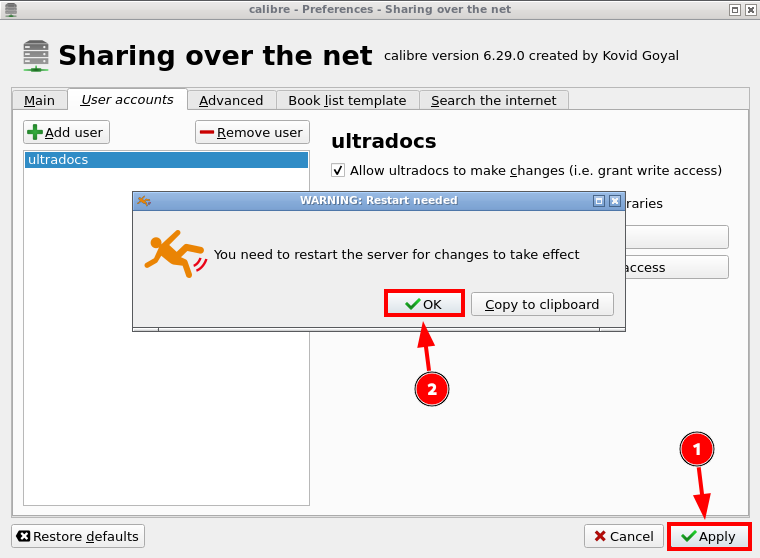
- To save the changes, click 1 Apply and 2 OK.

- Restart Calibre by executing
app-calibre restart, then wait 2-3 minutes to let the Calibre Content Server initialize.

- Once Calibre has been successfully restarted, go to Preferences > Sharing over the net, and take note of the IP-address and port the content server is listening at. In your case, the IP-address and port will be different than what is shown in the above image.
- The IP-address and port will be needed when connecting to your Calibre Content Server from another application, such as Readarr .
Calibre CLI
Calibre can also be managed via Command Line Interface instead of the webUI by interacting with the Calibre binaries. Documentation regarding the usage of the Calibre binaries can be found here. To execute an internal Calibre binary, you can use the app-calibre exec command.
- To list the binaries that are allowed on your Ultra.cc service, execute the following command:
app-calibre exec -l
- To execute an internal binary with included command option, execute the command in the following format:
app-calibre exec -c calibre-customize -a "--list-plugins"
app-calibre exec -c ebook-convert -a "--help"
- The above commands can of course be edited to any of the allowed binaries and their respective command options. Usage instructions can be found here.